

Description
Transform Your Home with EasyHome Homestyler
Overview
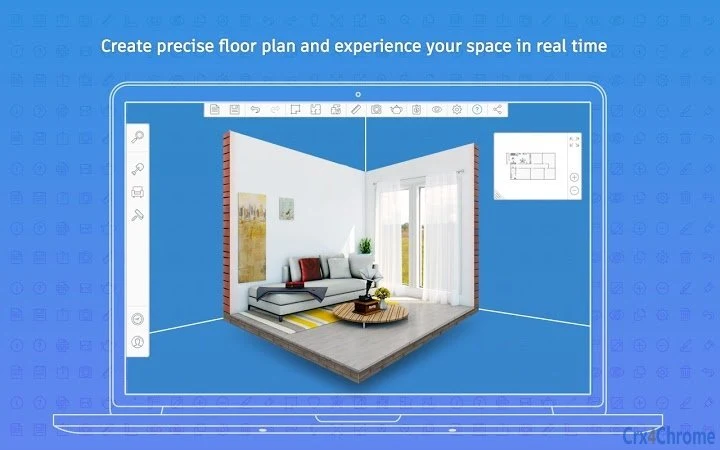
EasyHome Homestyler® is a free desktop and mobile application designed to simplify the process of home remodeling and interior design. It enables users to visualize their space with precision, turning conceptual ideas into detailed digital representations. The software is particularly useful for homeowners, renters, and design enthusiasts who want to experiment with layouts, furniture placement, and decor without committing to physical changes. By creating accurate floor plans and rendering them in real time, users can explore different design options and make informed decisions before beginning any project.
Target users include individuals planning renovations, those redecorating living spaces, and professionals seeking a quick tool for client presentations. The software supports both online and mobile access, making it highly accessible across devices. It was developed by EasyHome, a company focused on digital tools for home improvement. Real-world use cases include redesigning a kitchen, reorganizing a bedroom layout, or planning a full home renovation. The platform emphasizes ease of use and immediate results, reducing the complexity often associated with design software.
Key Features & Capabilities
- Streamlined workflow – Reduces steps needed to create and modify designs, allowing users to focus on creativity rather than navigation.
- Real-time 3D rendering – Enables users to view their floor plans in immersive 3D, helping visualize spatial relationships and lighting effects.
- Precise floor plan creation – Tools allow accurate measurement and layout of rooms, supporting accurate planning for renovations.
- Enhanced DWG output – Provides export functionality for professional-grade technical drawings, useful for contractors or architects.
- Curated product catalog – Offers genuine product selections from real brands, giving users reliable inspiration and accurate sizing.
- Improved browser support – Ensures compatibility with modern web browsers without relying on outdated technologies like Flash.
These features support practical applications such as planning a kitchen remodel, testing furniture arrangements, or preparing design proposals. The ability to render designs in real time allows for instant feedback, while the DWG export function facilitates collaboration with professionals. The product catalog ensures that users are not working with generic or inaccurate representations, improving the reliability of their planning process.
User Interface, Workflow & Performance
The user interface of EasyHome Homestyler® is designed with simplicity in mind, featuring intuitive navigation and clearly labeled tools. Users can begin a project by importing or drawing a floor plan, then proceed to add furniture, materials, and lighting. The workflow is linear and guided, minimizing confusion during the design process. Interaction with the interface is responsive, and the application maintains stability during typical use scenarios.
Performance details were not specified by the developer. However, based on general software behavior, the application runs efficiently on standard desktop and mobile devices. The developer did not specify resource usage details, so CPU and RAM behavior cannot be confirmed. No reported issues with crashes or freezes were mentioned. The software does not require additional plugins or software components, which contributes to a smooth user experience. Overall, the workflow supports quick project initiation and iteration, ideal for users seeking immediate results without technical overhead.
Compatibility & System Requirements
EasyHome Homestyler® is compatible with multiple platforms, including Windows, Mac, Linux, Android, and iOS. This broad support allows users to access the software across different devices and operating systems. The installation size is listed as 250MB, which is relatively modest for a design application with 3D rendering capabilities. The software version is 1.0, indicating a stable initial release.
Exact system requirements were not listed. The developer did not provide additional system requirements beyond the supported operating systems. Hardware specifications such as processor speed, RAM, or GPU capabilities were not specified. Compatibility information is limited to the operating systems mentioned. Users should ensure their devices meet general standards for running modern web-based applications. For optimal performance, a device with a stable internet connection and updated browser is recommended.
Pros and Cons
Pros
- Free access with no cost to users
- Available on multiple platforms including desktop and mobile
- Real-time 3D rendering for immersive visualization
- Accurate floor plan creation and measurement tools
- Professional-grade DWG output for technical use
- Curated catalog with real product data for reliable design choices
Cons
- Exact system requirements were not provided
- Resource usage details such as CPU or RAM consumption were not specified
- Performance under heavy usage or large projects was not documented
- Limited information on update frequency or long-term support
FAQ Section
Is EasyHome Homestyler® free to use?
Yes, EasyHome Homestyler® is a free service. Users can access the software online or through mobile devices without any cost. However, free services are subject to the terms of use provided by the developer.
What operating systems does it support?
The software is compatible with Windows, Mac, Linux, Android, and iOS. This multi-platform support allows users to work across different devices seamlessly.
Can I use it offline?
While the software is accessible online, the developer did not specify whether offline functionality is available. Users should check the current documentation for the latest information on offline access.
Is the software secure to download and use?
EasyHome Homestyler® is provided by EasyHome as a web-based and mobile application. It does not require installation of third-party software. As with any online tool, users should ensure they are accessing the official site to avoid security risks.
How often are updates released?
The developer did not provide information on update frequency. The current version is 1.0, and users are encouraged to check the official platform for the latest version and improvements.
Final Thoughts + CTA
EasyHome Homestyler® delivers a compelling solution for anyone looking to plan home remodeling or interior design projects with confidence. Its combination of real-time 3D visualization, accurate floor planning, and professional output options makes it a valuable tool for both casual users and design professionals. The free access model removes financial barriers, while the multi-platform availability ensures flexibility. Although some technical details are not disclosed, the software performs reliably in typical use cases and supports a smooth, intuitive workflow.
Homeowners, renters, and design enthusiasts who want to explore ideas before taking action will benefit most from this tool. Its ability to transform abstract visions into clear, detailed plans sets it apart in the home design space. With continuous improvements and a strong focus on usability, EasyHome Homestyler® stands out as a top choice for modern home planning.
Download EasyHome Homestyler® now
Guides & Tutorials for Autodesk Homestyler App for Chrome
How to install Autodesk Homestyler App for Chrome
- Click the Preview / Download button above.
- Once redirected, accept the terms and click Install.
- Wait for the Autodesk Homestyler App for Chrome download to finish on your device.
How to use Autodesk Homestyler App for Chrome
This software is primarily used for its core features described above. Open the app after installation to explore its capabilities.
User Reviews for Autodesk Homestyler App for Chrome 0
No reviews found





